
An AI you can actually trust.
Every suggestion is reversible. Every decision is yours to approve. And you choose what the AI sees: nothing at all with local Ollama, or exactly what you allow with your own cloud key.
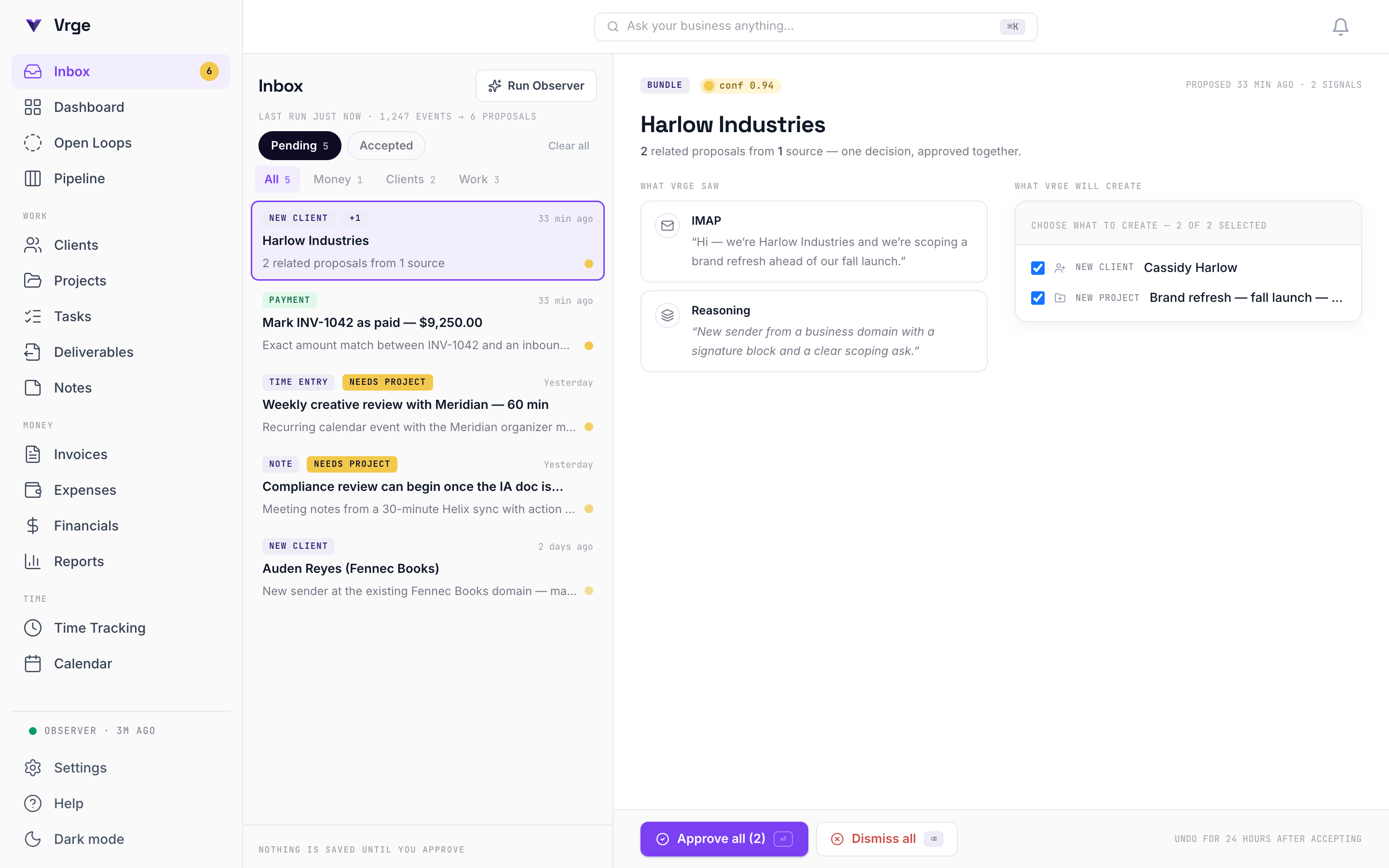
See it for yourself
Click through the real app: every screen, every proposal, every provenance badge. No signup, no sandbox.
It watches. It proposes. You decide.
Four capabilities run before you type anything: the pipeline that reads your tools, the queue it files into, the receipt on every record, and the way back out.
- AI Scanning Pipeline
- Silently watches email, calendar, files, and bank. Extracts structural evidence (email domains, calendar organizers, bank MCC codes) and proposes the matching clients, projects, tasks, and invoices. Never writes without your review.
- Proposal Inbox
- Every AI suggestion lands here, grouped into bundles with a one-sentence explanation and confidence score. Accept in one click. Reject and we learn. Nothing touches your real data until you say yes.
- Open Loops
- One page answering the question you wake up with: what do I owe people, and what do people owe me? Client threads waiting on your reply, threads that went quiet after you wrote, invoices past due, computed from who spoke last, not from anything you log. Answer the email or record the payment and the loop closes itself. Nothing falls through the cracks.
- Provenance on Every Entity
- Every entity knows where it came from: which email, meeting, transaction, AI model, and confidence at acceptance. Tap the badge to see the source.
- 24-Hour Undo
- Wrong call? Roll the whole bundle back with one click for 24 hours. Transactional, all-or-nothing.
- As Many Accounts As You Have
- Two Gmail addresses, a work and a personal calendar, a business account and a card. Connect them all. Every account is watched separately and stays separate: a problem with one never hides the others, and the same meeting arriving from two calendars is flagged rather than billed twice. No per-connection fee, ever.
The AI runs where you tell it to.
Local, redacted, or your own cloud key, and every call it makes is on the record, under a cap you set.
- Safe AI: Local or Redacted
- Run Ollama on your own machine. Fully airgapped, first-class, free. Or bring your own Anthropic, ChatGPT or Google Gemini key: the call goes straight from your device to your provider account, sending full content by default for the best results. Switch on redaction (names, emails, addresses and dollar amounts tokenised) or send only a local summary, and switch full content on or off for each email, calendar, file or accounting source (every account of that provider together). A preview shows what the mode in force would send, and lists any source set to send differently.
- AI Activity Log
- See every single AI call: when, which provider, what task, what it cost, and whether content was redacted.
- Per-User AI Budget
- Set a per-user daily token budget: circuit breaker at 80%, hard stop at 100%. No surprise bills.
And a real CRM underneath it.
Connect nothing at all and Vrge is still a working CRM: kanban, invoices, team sync, and your data in a file you can carry.
- Pipeline Kanban
- Drag clients through Lead → Active → Inactive. See revenue at every stage. Order persists with a single SQL column. Works offline, syncs instantly in team mode.
- Invoice Tracker + Banking Match
- Create invoices tied to projects, track payment status, and let Vrge match incoming deposits to open invoices from your Plaid/Stripe feed. Overdue flags, revenue pipeline, and reconciliation in one view.
- Team Mode + Realtime Sync
- Run it on your own server. Invite teammates by email, assign roles, and everyone sees changes the moment they happen. One file, no vendor, no monthly per-seat fees.
- Offline-First
- Works on a plane. Works in a coffee shop. Works airgapped.
- Portable Export
- One click and everything downloads as spreadsheet files: records, proposals, AI activity, origin records. Even with an expired license.
- Import From Your Old CRM
- Leaving HubSpot, Pipedrive, Salesforce, or a spreadsheet you have kept for years? Export it and drop it in. Vrge reads the column headings itself, so there is nothing to reformat, and shows you exactly what will happen before anything is saved: what is new, what you already have, what the file repeats. Clients you already have are matched, not duplicated. Undo the whole import if it was the wrong file. It brings your client list: names, emails, phones, companies, tags and notes. Deals and activity history stay behind, because Vrge rebuilds those from your real email, calendar and bank rather than importing a copy.
What Vrge will create
Northwind Studio
$2,400
- INV-0207
- Site refresh
- inferred · open invoice
- Paid
- inferred · memo match
A deposit landed in the bank feed and matched an open invoice. Nothing is saved until you accept it.
Extend Vrge with add-ons
Optional extras that tailor Vrge to how you work. Features you unlock are bought once and stay yours. The only thing billed monthly is a service that costs us every month to run, and you never need it.
White-Label Portal
Custom branding on client portals. Replace Vrge's logo, colors, and company name with yours, hide the 'Powered by Vrge' badge, and serve portal links from your own domain through your existing reverse proxy.
Includes
- Custom logo and favicon
- Custom brand colors and accent
- Custom company name in portal
- Remove 'Powered by Vrge' badge
- Requires a Team license: portals run on the team server
$99 / $199
$99 with Team Starter, $199 with Team Studio, included with Team Agency.
Mac and Windows
Vrge Cloud Backup
The same encrypted backups your folder gets, kept on our storage as well, so your records survive losing the computer they live on. Encryption happens on your machine with a recovery code only you hold, so we store the file but can never read it.
Includes
- Automatic off-machine backups
- Restore to any solo install with your recovery code
- Encrypted before it leaves your device: zero-knowledge
- Free alternative: point the same engine at your own Dropbox or Drive folder
- Solo installs only: a team server backs up its own database
- Also available annually at $60/yr
$6/mo
Mac and Windows
Feature unlocks are bought once and stay yours. Activate them in Settings → Add-ons. White-Label Portal needs a Team license, because client portals are served by the team server. Cloud Backup is the one monthly item, because we hold the files for you; the same encrypted backups run free to a folder you own, and you set it up in Settings → Data Management. It covers a solo install: on a team server the records live in the server's database, which you back up there.
Try it on your own laptop.
Free for 14 days, no account, no card. Run it locally, with Ollama if you like, and watch Vrge propose your first clients within 60 seconds.